


Stress Crusher Relaxing Games
4.582.00 Reviews
App Specs
- Version
- 6.78
- Updated On
- License
- Free
- Downloads
- 10,000,000+
- Developer
- Mad1 Games
- Categories
- Casual
- Platform
- Android
Screenshots




 Analysis by AppCompare
On a crowded evening, a shared phone can become a small point of friction: one person wants a quick distraction, another needs the device for a message, and nobody wants to start a long game. I see Stress Crusher Relaxing Games as best suited to those brief, low-pressure turns. It is a casual game from Mad1 Games, built around short calming activities rather than a demanding campaign, so it can fit into the gaps between household tasks without asking everyone to commit to the same goal.
Making a shared phone feel less like shared territory
Imagine waiting for dinner to finish while a family member wraps up a call. A quick turn with a soothing puzzle or coloring activity may be easier to fit in than a match-based game that expects attention until a round ends. That flexibility is the practical appeal here: the experience is about occupying a few minutes gently, not winning a contest or keeping up with a group.
On a shared device, I would agree on a simple handoff before opening any game: one person finishes their current activity, then passes the phone along. That is not a special feature; it is just a useful household habit. It prevents someone else from interrupting a breathing exercise or puzzle mid-flow, and it makes the app feel like an optional shared pastime rather than a device everyone has to claim at once.
Set expectations before handing over the device
Because a shared phone can contain personal notifications and other people’s accounts, I would not treat a relaxing game as a reason to hand over the whole device without thought. A parent or device owner can open the game first, check that the right person is using the phone, and agree on when it should be returned. Those boundaries are especially useful if the phone is also needed for calls, school messages, or work.
The game is free to download, with in-app purchases listed at $4.99 per item. That makes it sensible to explain purchases before a child or guest starts tapping around, and to use the device’s usual purchase safeguards where appropriate. I would also distinguish “free to start” from “nothing can ever cost money”: the listed purchase option is worth discussing in a household, even when the immediate goal is simply a short calming break.
Taking turns without turning relaxation into a chore
There is no need to make this a family routine with a timetable. In my view, the better approach is to use it when someone actually wants a quiet pause: after a noisy trip home, during a wait, or while another person is busy. If several people want a turn, agreeing on a natural stopping point is more considerate than setting a strict timer that makes a calming activity feel like another task.
Different activities may suit different people, so a useful way to coordinate is to let each person choose what feels comfortable rather than insisting that everyone try the same mode. One person may prefer a visual puzzle; another may find a breathing exercise more appealing. If an activity is not relaxing for someone, there is little value in persuading them to continue. The app works best as a menu of possible short breaks, not as a household prescription.
Worth Reading Before You Choose

Baby Panda World Brings Quick Play to Modern Phones, but Its Game Library Feels Busy

ESPN’s Live Game View Makes Following Close Games Easier

QuizzLand Review: A Good Fit for Short Trivia Breaks, Not Every Player

Basketball Stars: Multiplayer Is Fast, but Can It Recover When Matches Go Wrong?

WEBTOON Turns Phone Updates Into a Better Reading Routine

Link to Windows Runs on Shared Habits, Not Social Feeds
Age, trust, and a realistic role for the game
The content rating is Teen, so I would take that into account before giving the game to a younger child. A rating is a useful starting point, not a substitute for a parent’s judgement about a particular child or a shared device. I would look over the experience together first, talk about the in-app purchase option, and keep ordinary device boundaries in place. That is a more reliable approach than assuming that a calming theme automatically makes every app suitable for every age.
I also would not present a game as treatment for serious or ongoing anxiety. A short puzzle or breathing activity can offer a pleasant change of focus, but it is not a replacement for support from a trusted adult or a qualified professional when someone needs more help. That distinction matters in a family setting: the game can be one small way to take a pause, without being asked to solve a bigger problem.
Its audience figures suggest that plenty of people have tried it: it has a 4.4 average from around 25,000 ratings, and more than 10 million installs. I treat that as context rather than proof that every activity will suit every player. The game is free, carries a Teen rating, and has been available since November 27, 2024; its current version is 6.4, and it runs on Android 7.0 or later. Those details are useful when deciding whether an older household device can run it, while the rating and purchase option are more relevant to deciding who should use it.
A practical look at what the game offers
Ever had one of those days where stress just seems to pile up like laundry? Enter Stress Crusher Relaxing Games, the app that's like having your personal chill pill right in your pocket. I decided to give it a whirl, and let me tell you, it’s like a breath of fresh air.
Getting Started with Stress Relief
First off, downloading Stress Crusher Relaxing Games is a breeze. Available on both Android and iOS, it’s just a few taps away from gracing your home screen. Once installed, the app welcomes you with a calming blue interface that feels like a dip in a cool ocean. No complicated menus here—just simple and intuitive navigation.
A Variety of Games to Suit Your Mood
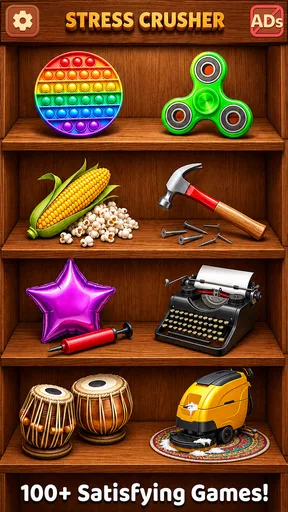
What really sets this app apart is the variety of games it offers. Whether you’re into soothing puzzles, meditative breathing exercises, or calming coloring activities, there’s something here for everyone. I spent my first session dabbling in a game called "Color Waves" where you fill intricate patterns with colors of your choice. It’s strangely satisfying and incredibly relaxing.
Next up was the "Breath In, Breath Out" section. It's basically guided breathing exercises that help you center yourself. If you've ever tried yoga or meditation, you'll feel right at home. It’s amazing how something so simple can have such a profound effect on your mood.
Why It Works
So, what makes these games effective? Well, it’s all about engagement and distraction. The app cleverly pulls your attention away from the everyday hustle and into a world of tranquility. Each game is designed to gently occupy your mind, providing a momentary escape from stressors.
One of my personal favorites is the "Puzzle Garden". It’s a blend of strategy and relaxation, where you piece together tranquil garden scenes. As someone who loves a good jigsaw puzzle, it’s like wrapping myself in a cozy blanket of calm.
Personal Experience and Tips
I found myself reaching for this app during breaks, especially on hectic workdays. One tip I’d share is to use it during transit or right before bed. It’s a great way to wind down, and the soothing background music is just the cherry on top.
Another cool feature is the daily reminders. The app nudges you gently, reminding you to take a breather. In our fast-paced world, it’s easy to forget to pause and de-stress, and these little reminders go a long way in building a consistent relaxation habit.
Final Thoughts
All in all, Stress Crusher Relaxing Games is a solid go-to for anyone looking to carve out a sliver of peace in their day. It’s user-friendly, beautifully designed, and most importantly, effective. Whether you’re dealing with work stress, study pressure, or just need a break from the daily grind, this app is worth a try.
So, next time you’re feeling overwhelmed, why not crush that stress with a game or two? Trust me, your mind will thank you!
How it compares with other casual breaks
Compared with a conventional puzzle game, this experience puts less emphasis on score-chasing and more on switching attention to a calm, contained task. Compared with a meditation app, its game activities may feel more approachable to someone who would rather interact with colors or a scene than sit through a formal session. That blend is its distinctive trade-off: players looking for a deep puzzle challenge, long-term progression, or competitive play may find it too lightweight, while people who want a gentle activity without a steep learning curve may prefer it.
If you usually reach for social games, this is also a different kind of break. There is no need to coordinate a match or wait for other players; the appeal is that a person can pick an activity and focus on it independently. On the other hand, anyone who finds on-screen activities stimulating rather than calming may be better served by stepping away from the phone, listening to quiet audio, or taking a walk. A digital distraction is not automatically a restful one.
Small choices that make a session work better
I would choose an activity based on the kind of pause I need, rather than opening the app and tapping around aimlessly. If my mind feels busy, a visual task can give it one clear thing to follow; if I want to slow down, a breathing exercise may be a better fit. This simple distinction helps keep the session intentional and makes it easier to stop once the break has done its job.
For a shared device, it can help to leave the phone in the same state you would want to receive it: finish the current activity, lower the volume if others are nearby, and pass it on rather than leaving someone to guess whether a session is still in progress. That is ordinary courtesy, but it matters more with relaxation activities than with a game designed around rapid turns. The goal is to make the next person’s use feel calm too.
Sound is another personal consideration. The original experience describes soothing background music, which may add atmosphere for one player but be unwelcome in a quiet room or around sleeping people. I would keep the device at a considerate volume and choose a different break if audio would disturb others. A calming app should not become a source of household noise or an argument over the phone.
Who will enjoy it, and who may want something else
I can see this working well for someone who wants an easy, low-commitment distraction during a work break, while waiting for an appointment, or between household chores. It may also appeal to a casual player who likes the tactile idea of filling patterns and assembling peaceful scenes but does not want a demanding game. The mix gives a household a few different ways to spend a short turn without requiring everyone to share the same taste.
I would skip it if you want a robust meditation program, detailed tracking of a relaxation routine, or a serious puzzle challenge. Those are different needs from a casual collection of soothing activities. I would also avoid relying on it when a phone needs to remain available for an urgent call or when screen time itself is causing tension. In those moments, a non-screen pause is likely the better choice.
For me, the most useful expectation is modest: this can help create a small pause, not guarantee a change in mood. Some sessions will feel satisfying; others may not land, depending on the activity and the moment. Treating it as an optional tool rather than a promise makes the experience more honest and helps avoid disappointment.
A household verdict
As a casual game from Mad1 Games, this is an approachable option for a shared household phone when people agree on turns, age suitability, and purchase boundaries. Its variety gives different users a chance to find an activity that fits their mood, and its lightweight nature makes it easier to pick up briefly than a game built around long sessions. The main cautions are equally practical: respect the Teen rating, remember that optional purchases exist, and do not expect a phone game to replace other forms of rest or support.
I would recommend giving it a try if you want a simple, low-pressure way to fill a quiet few minutes and you are comfortable with its casual approach. If your household needs a game with more structure, shared multiplayer, or a stronger focus on meditation, another kind of app may be a better match. For a brief solo turn that can be passed around with a little coordination, though, it has a clear place in the mix.
Pros
- Beautifully designed user interface.
- Wide variety of relaxing games.
- Encourages mindfulness and calm.
- Offline play available.
- Regular updates with new content.
Cons
- Contains in-app purchases.
- Requires frequent internet for updates.
- Some games may seem repetitive.
- Limited customization options.
- Ads can be intrusive.
FAQs for Stress Crusher Relaxing Games
What is Stress Crusher Relaxing Games?
Stress Crusher Relaxing Games is a mobile application designed to help users unwind and de-stress through various relaxing mini-games. The app offers a collection of games that focus on calming visuals, soothing sounds, and simple gameplay mechanics. It's available for both Android and iOS devices, providing a convenient escape from daily pressures.
Is Stress Crusher Relaxing Games free to download and play?
Yes, Stress Crusher Relaxing Games is free to download. However, it may offer in-app purchases to unlock premium features or additional content. While the basic version is enjoyable on its own, these optional purchases can enhance the gaming experience by providing more game variety and customization options.
Does Stress Crusher Relaxing Games require an internet connection?
No, Stress Crusher Relaxing Games does not require a constant internet connection. Once downloaded, you can enjoy the games offline, making it perfect for use during commutes or in areas with limited connectivity. However, some features, such as updates or additional content downloads, may require an internet connection.
Are there any ads in Stress Crusher Relaxing Games?
Yes, the app does contain ads, which is common for free-to-download games. These ads help support the developers and keep the app free. Users can typically opt to remove ads through an in-app purchase if they prefer an uninterrupted experience while playing the relaxing games.
Is Stress Crusher Relaxing Games suitable for all ages?
Yes, Stress Crusher Relaxing Games is designed to be suitable for all age groups. Its calming themes and simple gameplay make it an excellent choice for anyone seeking a stress-relief tool. Parents can feel comfortable allowing their children to play, as the content is non-violent and family-friendly.


